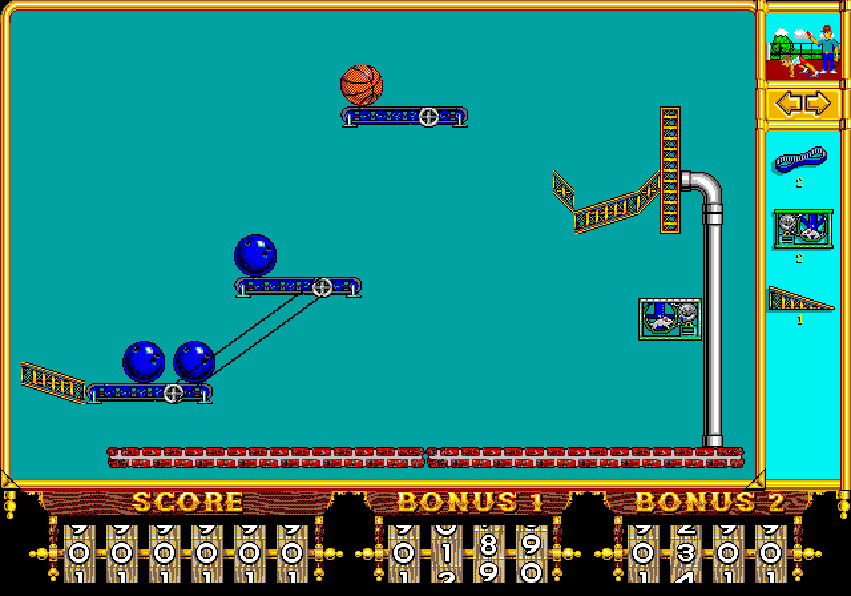
Gameplay is presented on a 2D puzzle screen where players drag and place parts into a workspace to trigger a required outcome, such as moving an object into a target or activating a switch. Each stage gives a limited set of components and often a budget, forcing careful planning and experimentation. The game emphasizes timing, object physics, and cause-and-effect chains. A single-player puzzle mode is the core experience, and a two-player competitive mode allows both players to solve the same puzzle as quickly as possible.
The Incredible Machine 2
DOSControls
These are the emulator defaults. You can remap them from the emulator menu.
PC Keyboard
Game Button
↑
Move up
↓
Move down
←
Move left
→
Move right
Space
Primary action
Enter
Confirm / start
Esc
Back / menu
Game-specific controls
No verified game-specific inputs or combos are available for this version yet.
Gameplay
Characters
No character information available
Strategy
Start by identifying the final trigger and work backward through the chain. Use inexpensive or simple components to test timing before committing to a full solution. Leave space for moving parts, and avoid letting one mechanism interfere with another too early. In more difficult stages, build the path of motion first, then fine-tune angles, delays, and launch power.
Cheats
No cheats or unlockables available
Tips
Tips and tricks
- Testing a partial chain often reveals timing problems before the full setup is finished.
- Some puzzles have multiple valid solutions, so try rerouting motion instead of forcing one exact layout.
- Keep movable objects clear of hazards until the intended moment to avoid accidental failures.
Comments
Loading...
How do you play The Incredible Machine 2 online?
Start The Incredible Machine 2 directly on this page with ClassicEmu. The emulator runs in your browser, so you can play online without installing a desktop emulator first.
Related Games
More games from nearby platforms and categories.